Troubleshooting Kafka Consumer: Solving Direct Memory OOM
The Mysterious Crash
Our production logs were suddenly flooded with java.lang.OutOfMemoryError: Direct buffer memory.
Surprisingly, the Heap memory (Xmx) was only at 40% usage. Standard tools like jmap or VisualVM showed no signs of typical object leaks.
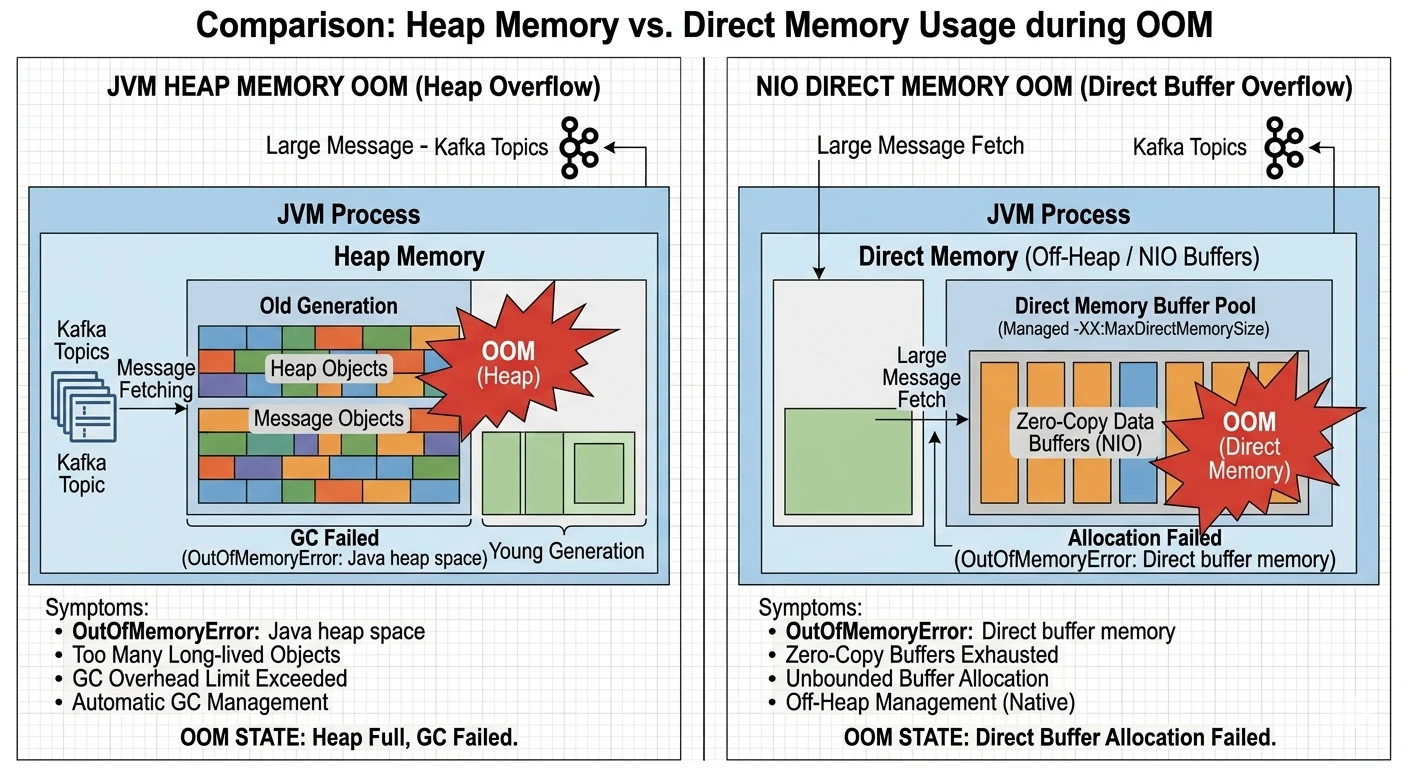
Comparison of Heap Memory vs. Direct Memory Usage during OOM events
In a cloud environment, this error often manifests because the JVM attempts to allocate native memory for I/O operations, but the host system (or the container limits) cannot fulfill the request.
Why Kafka Uses Direct Memory
Kafka is built for speed, and its primary optimization strategy is Zero-Copy. To minimize the CPU cost of data transfer, Kafka avoids copying buffers between the kernel space and the user space.
The Performance Choice: NIO & DirectByteBuffer
When using standard Heap buffers, the JVM must copy the data to an intermediate "temporary" direct buffer before passing it to the OS. By using ByteBuffer.allocateDirect(), Kafka writes directly to the native memory, allowing the OS to access it via DMA (Direct Memory Access).
Let's look at where this happens in the Kafka Client source:
// org.apache.kafka.common.network.NetworkReceive.java
public long readFrom(ScatteringByteChannel channel) throws IOException {
    int read = 0;
    if (size.hasRemaining()) {
        int bytesRead = channel.read(size);
        if (bytesRead < 0) throw new EOFException();
        read += bytesRead;
        if (!size.hasRemaining()) {
            this.buffer = ByteBuffer.allocateDirect(this.requestedBufferSize);
            // Direct Memory allocation happens here!
        }
    }
    // ... further processing
}
In the NetworkReceive class, the buffer is allocated using allocateDirect once the size of the incoming packet is determined. This ensures that the message data is read directly into native memory.
The Spring Kafka Flow
Even though we use Spring Kafka, the memory management is inherited from the underlying Kafka client.
-
KafkaMessageListenerContainer triggers the
poll()loop in a separate thread. - The KafkaConsumer calls the Fetcher to retrieve records.
- The NetworkClient manages the Selector, which uses NIO Channels to read bytes into Direct Byte Buffers.
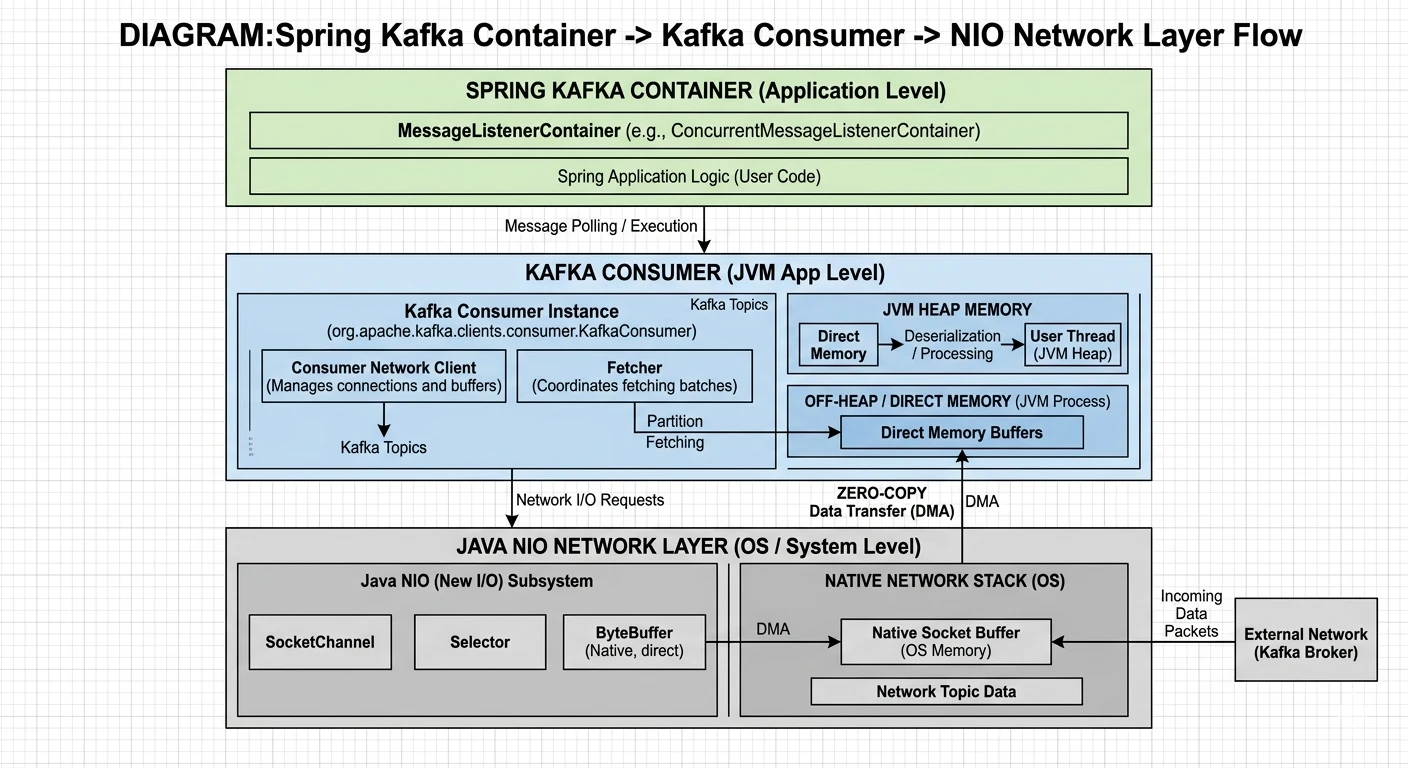
Spring Kafka Container -> Kafka Consumer -> NIO Network Layer Architecture
Identifying the Root Cause
In my case, the OOM was not caused by a memory leak, but by buffer accumulation.
The Catalyst: Compression & SSL
When messages are compressed (Snappy/Zstd) or encrypted (SSL), Kafka needs extra direct buffers for the intermediate transformation. If max.poll.records is large, these buffers can quickly exceed the JVM's MaxDirectMemorySize.
The Mathematics of Direct Memory
In a containerized environment, setting -XX:MaxDirectMemorySize should not be guesswork. We need to calculate the Theoretical Peak Usage based on our consumer configuration.
// Formula for Direct Memory Sizing
Total Direct Memory ≈ (Concurrency × fetch.max.bytes) × Overhead_Factor + Safety_Margin
-
Concurrency: The number of consumer threads (in Spring Kafka, this is the
concurrencysetting of the Listener Container). - fetch.max.bytes: The maximum amount of data the server should return for a fetch request (Consumer-level config).
-
Overhead_Factor:
- 1.0 for raw network I/O.
- +1.0 if using Compression (Decompression happens in a separate direct buffer).
- +1.0 if using SSL/TLS (Decryption requires another layer of buffering).
- Safety Margin: Usually 20-30% to account for metadata, internal Kafka client overhead, and unexpected network bursts.
For example, if you have 3 consumer threads, fetch.max.bytes set to 50MB, and you use Snappy compression over SSL, your calculation would be:
(3 × 50MB) × 3.0 (I/O + Decomp + SSL) = 450MB.
With a 20% safety margin, you should set -XX:MaxDirectMemorySize=540m.
The Solution: Tuning at the Consumer Level
1. Limit and Monitor Direct Memory
By default, -XX:MaxDirectMemorySize matches the Heap size. In a container with 2GB RAM, if you set -Xmx1536m, you only have 512MB left for the OS, Metaspace, and Direct Memory.
2. Kafka Consumer Optimization
These parameters are configured at the Kafka Consumer level. Reducing the fetch size allows the client to reuse smaller buffers more frequently, lowering the peak direct memory pressure.
# spring application.yml (Consumer-level properties)
spring:
  kafka:
    consumer:
      properties:
        fetch.max.bytes: 1048576 # 1MB per fetch
        max.partition.fetch.bytes: 1048576
        max.poll.records: 100
Summary
Direct Memory OOM in Kafka consumers is a classic example of performance optimizations leaking into operational complexity. By understanding the Zero-Copy mechanism and the underlying NIO allocation, we can move from guesswork to precise tuning.
- Always set
-XX:MaxDirectMemorySizeexplicitly in Kubernetes. - Monitor
java_nio_buffer_countandjava_nio_buffer_used_bytesmetrics. - Scale the consumer's fetch size based on the message volume, not just the throughput goals.