Developer Playground
Spring Actuator Port Separation: MVC and WebFlux Have Different Levels of "Isolation"
Table of Contents
The Problem
While operating Spring Cloud Gateway (SCG) in an EKS environment, I separated the Actuator port (management.server.port) for stability. I naturally assumed that "even if the main service crashes due to traffic overload, the health check would still be alive" - just like in the Spring MVC (Tomcat) days.
But then a question arose:
"Netty is based on Event Loops - does just changing the port actually separate the threads?"
Starting from this question, I dug into the thread model differences between MVC and WebFlux, and what port separation means in each environment.
MVC vs WebFlux: Fundamental Thread Model Differences
The bottom line is: "Spring Context and server instances are separated, but in WebFlux, threads (Event Loops) are shared."
| Characteristic | MVC (Tomcat) | WebFlux (Netty) |
|---|---|---|
| Thread Model | Thread-per-Request | Event Loop |
| On Port Separation | Separate Tomcat Connector + Thread Pool | Separate HttpServer + Same Event Loop |
| Thread-Level Isolation | Yes (Possible) | No (Not Possible) |
| Context/Instance Isolation | Yes | Yes |
MVC (Tomcat): Thread-per-Request and Thread-Level Isolation
Spring MVC uses Tomcat as its default embedded server and follows the Thread-per-Request model. Each request is assigned a thread from the thread pool for processing.
Effect of Port Separation in MVC
- Separate Connector Created: Setting
management.server.portcreates a separate Tomcat Connector. - Separate Thread Pool Allocated: Each Connector gets an independent thread pool (Executor).
- Real Isolation: Even if all 200 threads on the main port (8080) are exhausted, the management port (9090)'s thread pool remains available, so health checks respond normally.
MVC Actuator Port Separation Configuration (application.yml)
server:
  port: 8080  # Main application port

management:
  server:
    port: 9090  # Actuator dedicated port
  endpoints:
    web:
      exposure:
        include: health,info,metrics
With this configuration, MVC environments achieve complete thread-level isolation. Main service load does not affect Actuator responses.
WebFlux (Netty): Event Loop and Global Resource Sharing
Spring WebFlux uses Netty as its default server and follows the Event Loop model. It handles many concurrent connections with a small number of threads (usually equal to CPU cores).
Key Point
When you separate ports in WebFlux, a separate HttpServer object is created and a separate Child ApplicationContext is spawned. However, Netty shares the Global Event Loop (Worker Threads) through ReactorResourceFactory for resource efficiency.
How Port Separation Actually Works in WebFlux
- Separate HttpServer: A separate Netty HttpServer instance is created for each port.
- Separate ApplicationContext: A Child Context is created for the management port.
- Same Event Loop Shared: But the Worker Threads (Event Loops) that actually process requests are shared!
Result: If a blocking call accidentally occurs in the main logic and blocks the Event Loop, the Actuator (9090) using the same Event Loop also freezes.
Event Loop Sharing Structure in WebFlux
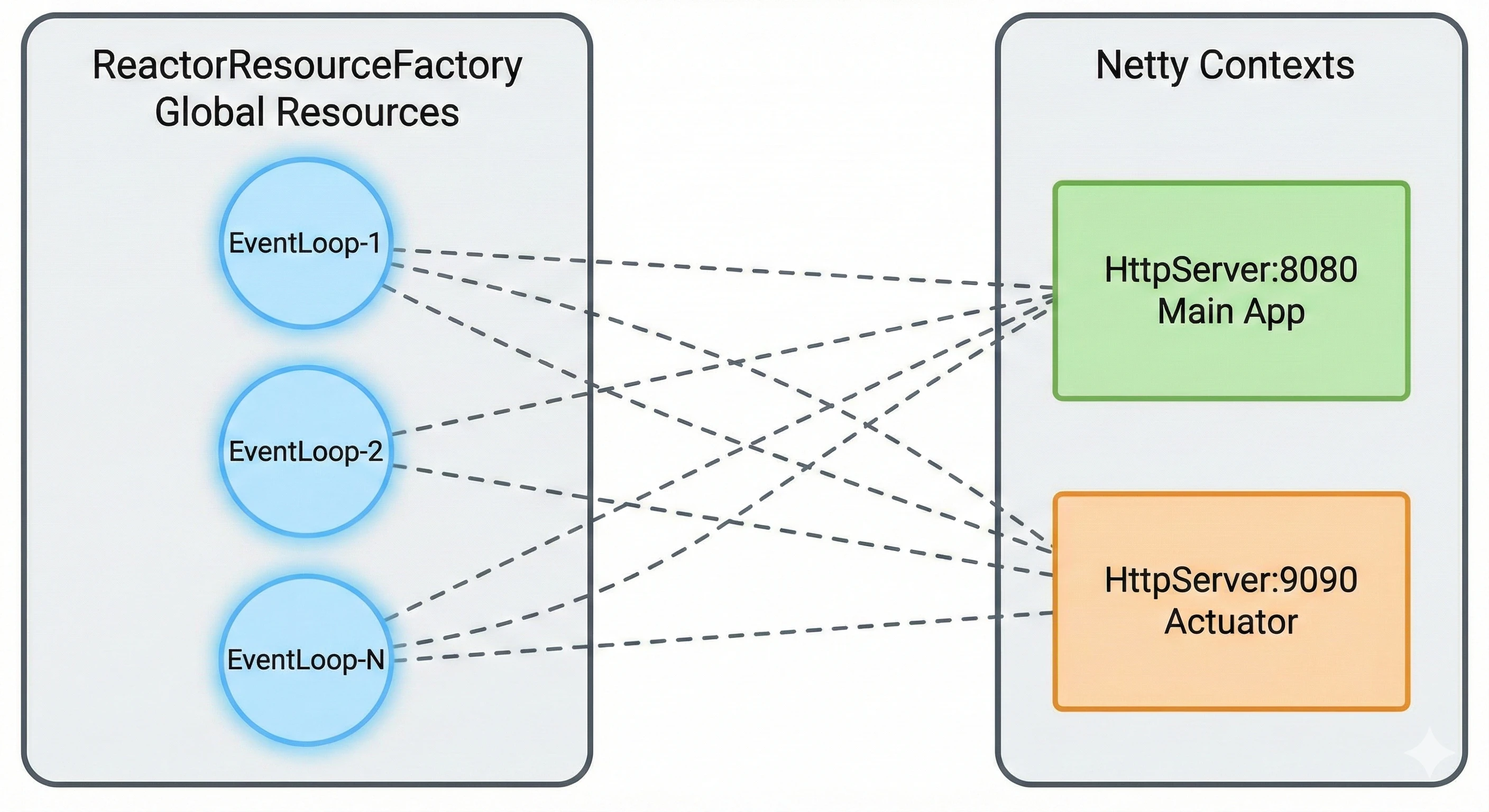
⚠️ Both ports share the same Event Loop!
Analogy: Same Kitchen, Different Entrances
The WebFlux situation becomes clearer with a restaurant analogy.
MVC (Tomcat) - Complete Separation
[Front Door (8080)] → [Kitchen A] ← Chef Team A
[Back Door (9090)] → [Kitchen B] ← Chef Team B
→ Completely separate kitchens with independent chefs
WebFlux (Netty) - Only Entrances Separated
[Front Door (8080)] ─┬→ [Same Kitchen] ← Same Chefs
[Back Door (9090)] ─┘
→ Different entrances, but same kitchen with same chefs
The Result: If there are too many customers at the front door and the chefs (Threads) are overwhelmed, the staff meal request (Health Check) coming through the back door also cannot be processed.
The Real Value of Port Separation in WebFlux
So is port separation meaningless in WebFlux? No. It's still essential. (Especially in EKS environments)
Even without performance isolation, the benefits in 'security' and 'operations' are clear.
Real Benefits of Port Separation
-
✓
Security Breach Prevention:
Sensitive endpoints like
/actuator/envand/actuator/heapdumpcan be blocked from external load balancer exposure at the network level (K8s Service). -
✓
Clear Probe Configuration:
K8s Liveness Probe targets 9090, actual traffic goes to 8080, cleanly separating traffic paths.
-
✓
Simplified Firewall Rules:
NetworkPolicy configuration is easier when the Actuator port is only accessible within the cluster.
| Isolation Type | MVC | WebFlux |
|---|---|---|
| Thread/Performance Isolation | Yes | No |
| Network/Security Isolation | Yes | Yes |
| Context/Instance Isolation | Yes | Yes |
The Right Approach: Eliminating Blocking Code with BlockHound
To prevent Gateway freezes in WebFlux, instead of relying on port separation, the right approach is to eliminate blocking code in the main logic.
BlockHound is a library created by the Project Reactor team that detects blocking code running on Event Loop threads at runtime.
Adding BlockHound Dependency (build.gradle.kts)
dependencies {
    // Use only in test environment
    testImplementation("io.projectreactor.tools:blockhound:1.0.9.RELEASE")
}
BlockHound Configuration (Test Code)
import reactor.blockhound.BlockHound
import org.junit.jupiter.api.BeforeAll

class GatewayBlockingDetectionTest {

    companion object {
        @JvmStatic
        @BeforeAll
        fun setUp() {
            BlockHound.install()
        }
    }

    @Test
    fun `should detect blocking call`() {
        // BlockingOperationError is thrown if blocking code exists
        Mono.fromCallable {
            Thread.sleep(100)  // This code gets detected!
        }.subscribeOn(Schedulers.parallel())
         .block()
    }
}
Common Blocking Patterns Detected by BlockHound
Thread.sleep()- JDBC driver calls (when using JDBC instead of R2DBC)
- Synchronous I/O with
InputStream/OutputStream - Waiting in
synchronizedblocks - Lock waiting with
ReentrantLock, etc.
Note: BlockHound has performance overhead, so it should only be used in test/development environments, not production.
Conclusion and Recommendations
Key Takeaway
Port separation in WebFlux is for 'security/management isolation', not 'performance isolation'.
Recommendations
-
1
When using MVC: Port separation provides real thread isolation. Use it with confidence.
-
2
When using WebFlux: Use port separation only for security/management purposes. Don't expect thread isolation.
-
3
The right approach for WebFlux: Detect and eliminate blocking code with BlockHound.
-
4
Monitoring Strategy: Monitor Actuator endpoint response times separately for early detection of Event Loop blocking.
One-Liner for Interviews/Tech Sharing
"Separating Actuator ports creates separate Netty Server Contexts, but Event Loop Resources are shared."
Advertisement